AI-assisted · Oct–Nov 2026
PPlan
Offline task manager for Windows that keeps a whole workspace in one portable file.
TL;DR
- Built with Claude Code in nine days.
- One .pplan file is the whole workspace, a SQLite database with every task, label, reminder and attachment; a test copies it and compares every row and every byte.
- Quick Add from anywhere with natural-language parsing, real RFC 5545 recurrence, and Windows reminders that survive restarts.
- Fully offline: no account, sync, telemetry or updater, and a content security policy that forbids remote origins.
PPlan is a task manager for Windows 11 that keeps a whole workspace, with its projects, tasks, labels, reminders, settings and attached files, inside one portable .pplan file. Copy the file to another computer, open it there, and everything is as you left it. It's fully offline: no account, no sync, no telemetry and no update check.
What it does
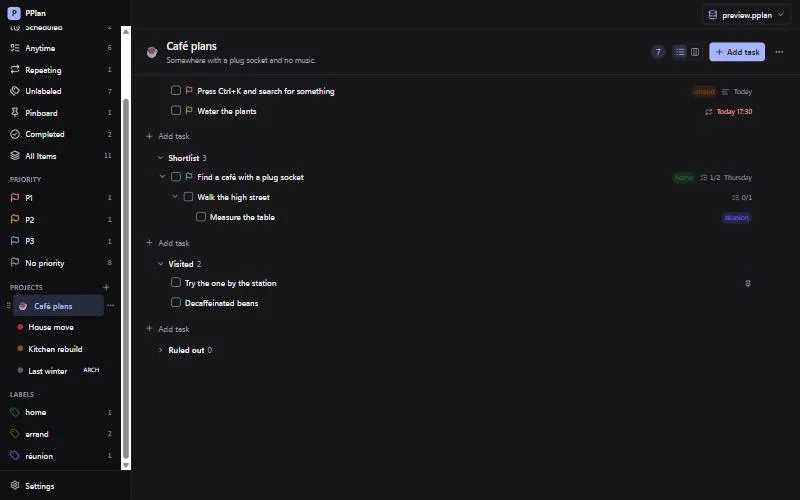
- Projects, sections and sub-tasks of any depth, in a list or on a board.
- Smart views such as Today, Scheduled, Repeating and Pinboard, plus one per priority and one per label, each with a count that always matches what it shows.
- Real recurrence with RFC 5545 rules and a catch-up loop, so a task five days overdue doesn't stay overdue after you tick it.
- Quick Add from anywhere (
Ctrl+Alt+Space) with natural-language parsing:Buy milk tomorrow 5pm #errands @shopping p1becomes a task with a date, a project, a label and a priority. - Reminders as Windows notifications, from a scheduler that survives restarts and folds a backlog into one summary.
- Search on
Ctrl+K, light and dark themes, and a keyboard route to everything.
How it's built
- Tauri 2, with a Rust backend and a React and TypeScript frontend.
- The workspace file is a SQLite database. Writes are immediate, and "Save a copy" uses
VACUUM INTOto produce one complete, self-contained file. - A portability test builds a workspace, copies it, and compares every table row by row and every attachment byte by byte.
- Daily backups, JSON export and import, and a per-user installer that needs no administrator rights.
- Its feature set was inspired by Planify, a GNOME task manager, but PPlan shares no code with it.
Built with Claude Code
I designed the app and wrote its plan, then directed Claude Code session by session, reviewing and testing every change before it was committed.
PPlan was built with Claude Code in nine days, from 26 October to 3 November 2026. The repository keeps the working brief (CLAUDE.md) next to the spec, data model and testing docs. Version 0.1.0 is done; the code and installers stay private for now.
Media
Screenshots and art
The same project as a board. Everything about a task in one panel. Search ignores accents: “cafe” finds “café”.
Like this?
Let's talk
Open to conversations about developer and production roles, and collaborations. I'm in Recife, Brazil (UTC−3).